
Picture to Text Converter
Get the text out of a photo, screenshot or PNG, including the parts ordinary OCR mangles: formulas come back as LaTeX and tables as tables.
- Photos, screenshots, PNG
- Formulas and tables kept
- Copy or download
Paste a screenshot of the page with Ctrl+V
or drop an image here · PNG, JPG, WebP · large images are resized for you
Every formula on the page, listed one by one.
Sample result
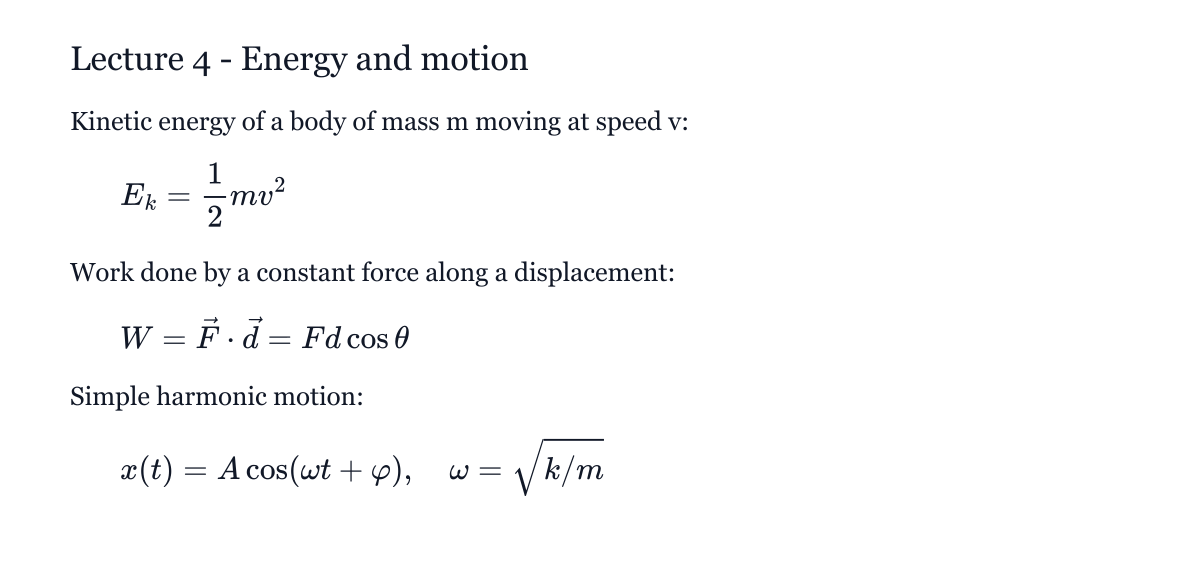 became
Lecture 4 - Energy and motion
Kinetic energy of a body of mass m moving at speed v:
$$E_{k}=\frac{1}{2} m v^{2}$$
Work done by a constant force along a displacement:
$$W=\vec{F} \cdot \vec{d}=F d \cos \theta$$
Simple harmonic motion:
$$x(t)=A \cos (\omega t+\varphi), \quad \omega=\sqrt{k / m}$$How to convert a picture to text
Step 1: Add the picture
Paste a screenshot, drop a photo or choose a PNG or JPG.
Step 2: Extract the text
Sign in and convert; a picture with text uses 10 credits.
Step 3: Copy or download
Copy everything as Markdown text, download it, or copy single formulas.
Picture to text for study and work material
Most free picture-to-text tools are fine for plain sentences. Screenshots of lecture slides, papers or worksheets are different: they mix text with formulas and tables, and that is what this converter is built for.
Reading a whole page uses the high-accuracy engine: a free account and 10 credits per image. New accounts get free credits to try it; single formulas stay free on the home page.
Output you can keep editing
The text comes back as Markdown: paragraphs stay paragraphs, tables stay tables, and formulas are LaTeX you can paste into a document or render in a Markdown editor.
Other converters
- Image to LaTeX ConverterPaste or upload a math screenshot or picture and get LaTeX, MathML and an editable Word equation, with a live preview to fix any symbol.
- Image to Markdown ConverterTurn a picture of notes or a page into Markdown with LaTeX math blocks and tables.
- Handwriting to Text ConverterTurn photos of handwritten notes into editable text, with formulas kept as LaTeX.
- Image to Word ConverterTurn a JPG or PNG of a page into an editable Word document with native Word equations.
- Image to Excel ConverterTurn a picture of a table into an Excel spreadsheet with rows and columns kept.
Picture to text questions
- Is picture to text free here?
- Extracting the text of a whole picture needs a free account and 10 credits; new accounts get free credits. Converting a single printed formula is free on the home page.
- Which image formats work?
- PNG, JPG, WebP and GIF, up to 2 MB after the in-browser resize.
- Can it read tables?
- Yes, clear tables come back as Markdown tables. For a spreadsheet, use the image to Excel converter.
- Is my picture stored?
- No. It is read and discarded; the text result is kept in your history.