
When you begin with a scientific dark template for your Beamer dark theme, the layout and styling fit your presentation.
But if you want to preserve an existing layout but apply a small palette, you’ll need to know which color themes are available.
The Beamer documentation provides examples of how to use both the layout theme plus the color theme.
You can document the ordering example like this: \usetheme{Madrid}, then \usecolortheme{beaver}.
To build a dark-themed background in LaTeX for a mathematical slide, I’ve assembled two configurations, one from the Overleaf dark template and another from the LetX dark theme. These demonstrate the distinction between templates that use a palette and explicit canvas settings.
I’m using the Overleaf dark theme as the basis, with a black background, bright colors, and shaded headers. The code provided below uses the \definecolor command followed by \setbeamercolor commands.
Overleaf dark template
\definecolor{myblack}{RGB}{27,27,27}
\setbeamercolor{normal text}{fg=white,bg=myblack}
\setbeamercolor{frametitle}{fg=orange,bg=black}
LetX dark theme
bgdark = HTML 0F172A
textlight = HTML F8FAFC
cardbg = HTML 1E293B
\setbeamercolor{background canvas}{bg=bgdark}
\setbeamercolor{normal text}{fg=textlight,bg=bgdark}
\setbeamercolor{frametitle}{fg=textlight,bg=bgdark}
Minimal LaTeX example
I’ve also assembled a minimal LaTeX example, which contains one editable display equation and a standard scientific block. The block’s title and body color settings are shown separately below, outside this minimal document. This is an example of the native LaTeX display delimiters. Before \begin{document}, use:
\definecolor{bgdark}{HTML}{0F172A}
\definecolor{textlight}{HTML}{F8FAFC}
\definecolor{cardbg}{HTML}{1E293B}
\setbeamercolor{background canvas}{bg=bgdark}
\setbeamercolor{normal text}{fg=textlight,bg=bgdark}
\setbeamercolor{frametitle}{fg=textlight,bg=bgdark}
\setbeamercolor{block title}{fg=textlight,bg=cardbg}
\setbeamercolor{block body}{fg=textlight,bg=bgdark}
For the equation, the math-mode reference uses bracket delimiters: [x^{2} + y^{2} = z^{2}].
\documentclass{beamer}
\begin{document}
\begin{frame}

\frametitle{Some math}

This is a short paragraph describing some math.

$$

x^{2} + y^{2} = z^{2}

$$

\end{frame}
\begin{frame}

\frametitle{An important point}

\begin{block}{What's important}

This block has its own title.

\end{block}

\end{frame}
\end{document}
The code for the first frame includes the basic structure:
\begin{frame}

\frametitle{Some math}

This is a short paragraph describing some math.

$$

x^{2} + y^{2} = z^{2}

$$

\end{frame}
The second frame adds the block:
\begin{frame}

\frametitle{An important point}

\begin{block}{What's important}

This block has its own title.

\end{block}

\end{frame}
And sets colors for the block’s title and body:
\setbeamercolor{block title}{fg=textlight,bg=cardbg}
\setbeamercolor{block body}{fg=textlight,bg=bgdark}
The above is assembled from documented commands, but I haven’t compiled them independently to ensure their correctness.
Complete template files and rendered PDF
If you choose to use the complete template, it depends on several files, including the preamble, and figures/uni_logo.png and figures/mail_logo.png. The Overleaf template loads \usetheme{CambridgeUS}, then \usecolortheme{owl}. It also requires the custom mydefs package. In any case, the PDF that results will allow you to inspect separately styled elements such as normal text, displayed equations, frame titles, block titles, and block bodies. The suitability of the palette will be evident in the rendered PDF.
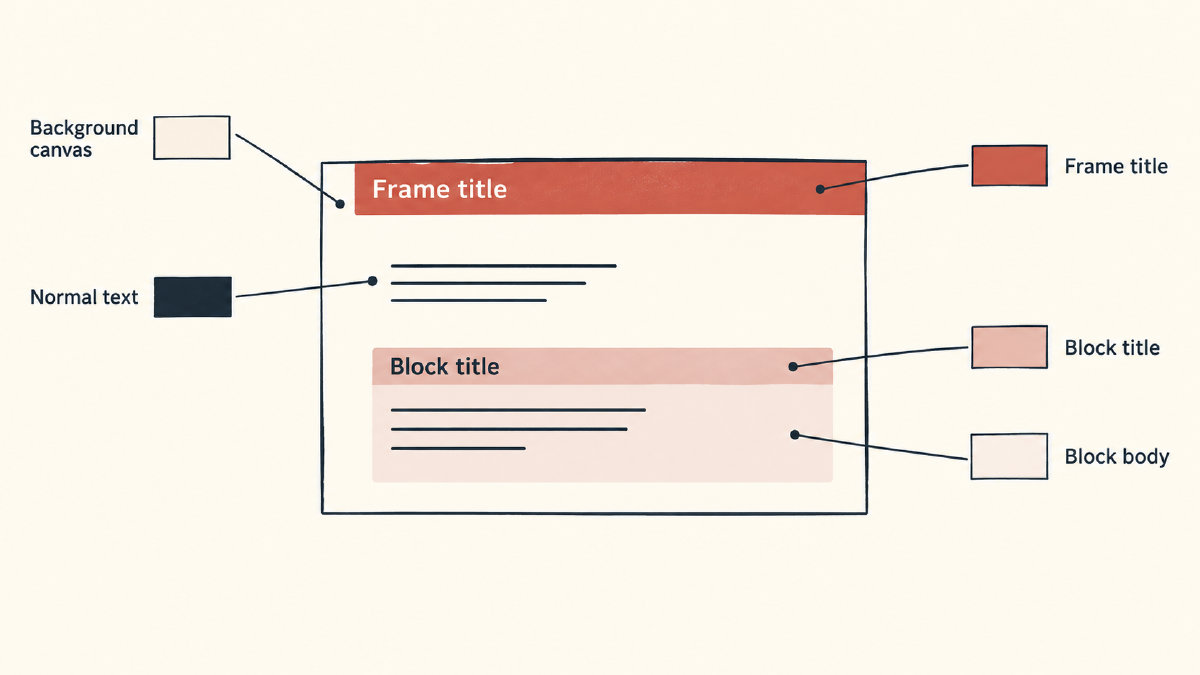
As for palettes, here are three named alternatives, along with the dominant foreground colors each would provide. When choosing among these, refer to the appropriate documentation for further guidance.
CTAN beamerdarkthemes
black background
cormorant: green
frigatebird: red
magpie: blue
The archive files for these palettes include the following:
beamercolorthemecormorant.sty
beamercolorthemefrigatebird.sty
beamercolorthememagpie.sty