
You can use the following complete slide example for a Beamer footnote, which reports its compilation and bottom placement to Stefan Kottwitz:
\documentclass{beamer}
\usetheme{Singapore}
\usepackage{blindtext}
\newcommand\blfootnote[1]{%
\begingroup
\renewcommand\thefootnote{}
\footnote{#1}%
\addtocounter{footnote}{-1}%
\endgroup
}
\begin{document}

\begin{frame}

Text\blfootnote{Unnumbered footnote}

\blindtext

Text\footnote{Numbered footnote}

\end{frame}

\end{document}
Stefan Kottwitz reported that the footnote text appears at the bottom. You can open the example in Overleaf to compile it. He also reported that he was able to test the theme with Warsaw and Singapore.
How the unnumbered beamer footnote works
In this example, we're adding an unnumbered footnote using a macro that temporarily suppresses the printed number and offsets the counter increment. In the frame itself, the unnumbered call is followed by the normal note, which will advance the numbering as well. The unnumbered call uses \blfootnote, which is called with one argument, #1. The subsequent normal note, called with \footnote, restores the normal numbering.
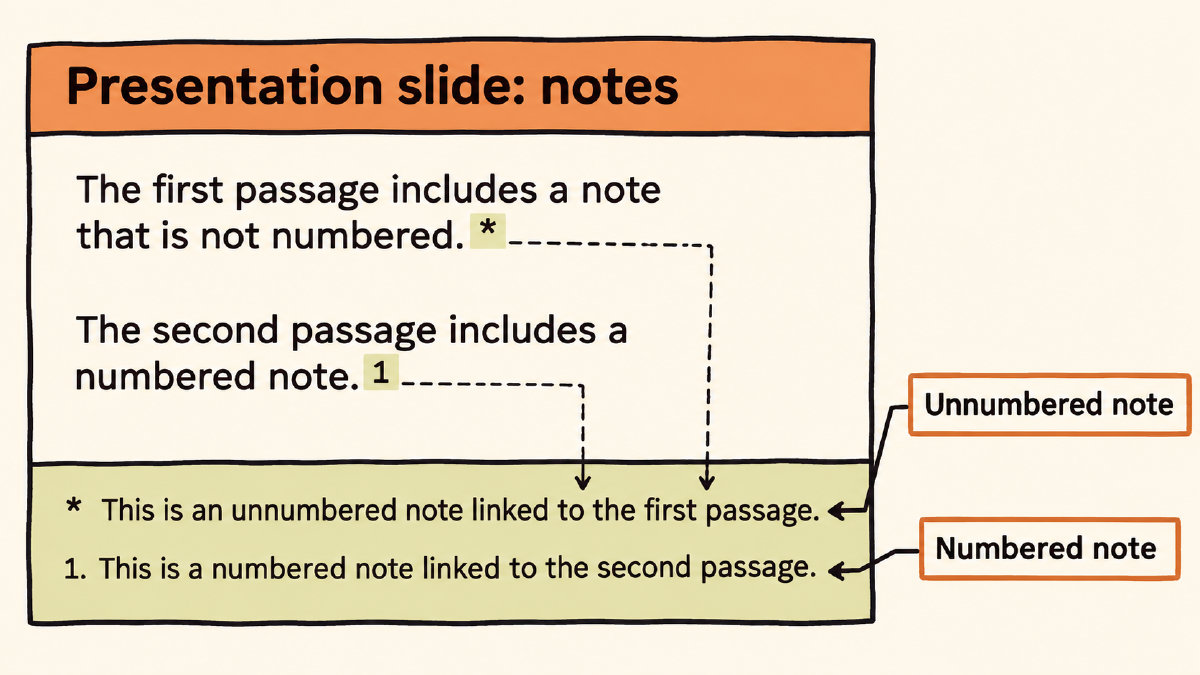
The command \begingroup and \endgroup create a local scope for the empty representation. \renewcommand\thefootnote{} causes the footnote representation to be empty, while \footnote{#1} adds the footnote text to the page. The counter is incremented by default, so we must adjust it afterward by subtracting one with \addtocounter{footnote}{-1}.
When you add \blfootnote{Unnumbered footnote}, then Text, the \blfootnote is added without a number, followed by some blind text. Then you add \footnote{Numbered footnote}. That should normally increment the numbering. Since we canceled only the preceding unnumbered note's counter increment, the normal note advances the numbering as usual. We don't need to fix the numbering.
If the unnumbered footnote does not appear
If you don't see the unnumbered footnote on your presentation, you might want to compare your code to a minimal working example. Other code in your document or a slide that's already too full may explain why the note doesn't appear. Either way, the administrator suggests you supply a minimal working example that reproduces the missing note.