
In this article, I explain how to insert a horizontal line in LaTeX. In most cases, you’ll be drawing a text-layout horizontal line: an explicit rule (LaTeX’s \rule) that appears on the page as if it were printed there by hand. There are also other lines you might draw — such as the bars of fractions and overlines for symbol accents — but those belong to math notation.
Using rule command
The default starting point for inserting a horizontal line is LaTeX’s built-in command, \rule. The syntax for \rule is simple enough:
\rule{width}{thickness}
Where width is how wide you want the line to appear and thickness how thick the line should be. You may optionally add brackets after the \rule command to raise or lower the line vertically:
\rule[raise-height]{width}{thickness}
By default, LaTeX doesn’t provide much vertical space around your horizontal rule. So, if you need more, you can manually set it with commands like \vspace.
\rule{\linewidth}{0.4pt} provides a very thin, full-width separator between paragraphs. Because we use \noindent before the rule, the paragraph indentation won’t move or shorten the line. The cited example adds 2cm of vertical space after the rule using \vspace*{2cm}.
\rule[2pt]{3cm}{0.4pt}
\rule{3cm}{0.4pt}
\rule[2pt]{3cm}{0.4pt}
\rule{3cm}{0.4pt}
Width
Thickness
Raise-height
If you’d like to tune the appearance of the separator, you can adjust its thickness, raise it above the surrounding text, and even control the gap above and below the line. Here, I demonstrate how to raise the line above the normal baseline.
\rule{\linewidth}{0.4pt}
\rule[7pt]{\linewidth}{0.4pt}
\rule{\linewidth}{0.4pt}
You’ll probably want to leave some space between your horizontal line and the following or preceding text. One way to do that is by using the command \vspace to manually set the gap between the line and the text that follows it. Alternatively, you could use either the thickness of the line itself, or raise it so it appears higher on the page.
The only difference between these two versions is the raise-height value: 7pt versus 0pt.
\rule[7pt]{\linewidth}{0.4pt}
\rule{\linewidth}{0.4pt}
\rule[7pt]{\linewidth}{0.4pt}
\rule{\linewidth}{0.4pt}
Thickness
Raise-height
Using hrulefill
While \rule provides a consistent, explicitly sized horizontal line, LaTeX has another command that’s designed to span across the width of the text: \hrulefill. As the name implies, \hrulefill stretches through all available horizontal space within a line. It works well when you want to follow a label or anchor in the middle of running text, for example.
Label:\hrulefill
Unlike \rule, which defines the horizontal line explicitly, \hrulefill uses fill to stretch into whatever space is left. Inside a paragraph, that behavior means the line occupies the remaining space on the line rather than creating an explicit rule of a chosen width.
Comparing hrule and rule
There’s a clear syntax difference between \hrule and LaTeX’s \rule command, even though both can draw a horizontal rule. The main difference is that \hrule is actually a plain TeX primitive, while \rule was originally introduced as part of LaTeX’s package. This means that \hrule is available as a TeX primitive without loading a LaTeX package, but it is a separate command from LaTeX’s \rule and uses a different syntax.
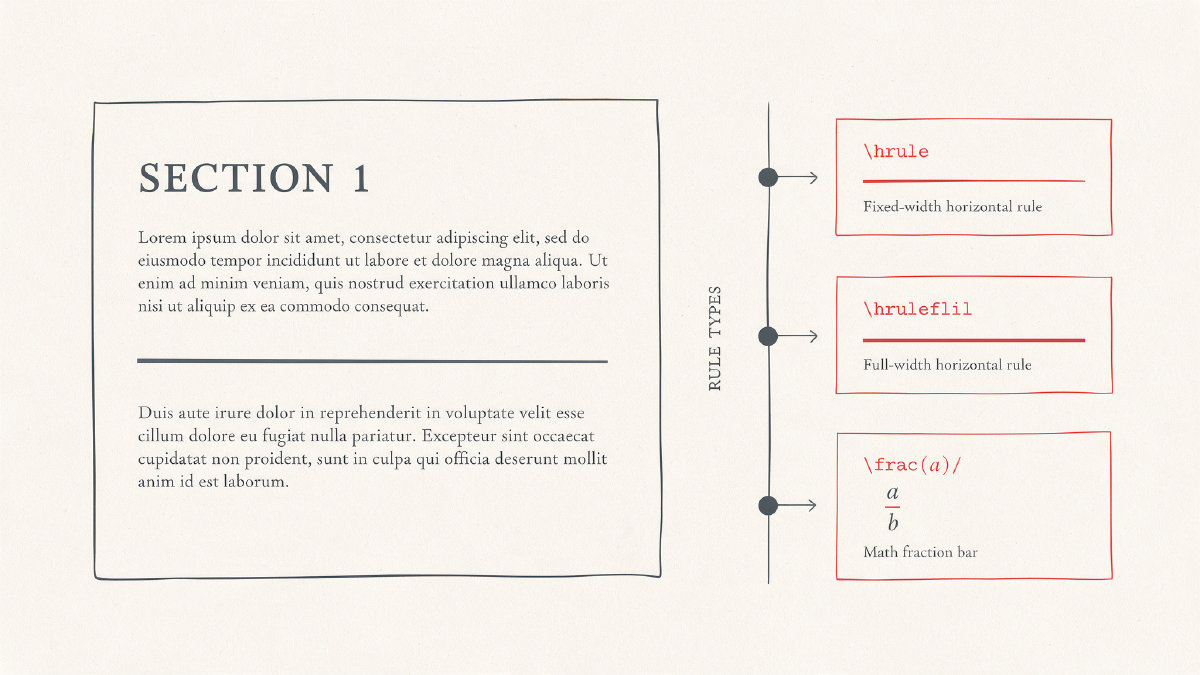
In plain TeX, the equivalent full-width rule is written as \hrule height .2pt depth .2pt width \textwidth. Unlike \rule, \hrule is a TeX primitive and uses this attribute syntax rather than LaTeX’s width and thickness arguments.
\hrule height .2pt depth .2pt width \textwidth
\rule
\rule
plain TeX primitive
\rule
Text mode versus math mode
The final thing you’ll need to consider when choosing whether to create a horizontal rule is whether it’s going to be used within text mode or math mode. If you’re trying to create a fraction bar, you don’t want to use a layout command, such as \rule, to create it. Instead, use the command \frac. Similarly, if you’re trying to place a line above a mathematical symbol, use \bar or \overline instead of a layout rule.
\frac{a}{b}
\bar{a}
\overline{abc}
Fraction
Vinculum
Symbol accent
Math mode
Packages and extensions
Finally, you can see that basic black rules such as \rule, \hrule, and \hrulefill require no additional package to make them function. Any package extensions you use beyond that are simply meant to extend LaTeX’s capabilities with color or fancier decorations.
No package required
\rule
\hrule
\hrulefill
Color extensions
Fancy decorations