
In this article, I want to walk you through the theorem box LaTeX code snippet provided below. This example will help you get started with using TikZ environments in your document.
The environment name mismatch
The first thing you’ll see is that there’s an environment-name mismatch between the declaration and its use. The environment has been defined with the name “theo”, but it’s used as “thetheo”. In addition, the definition of the environment is incomplete.
Why? Because the snippet is just showing the individual settings for each component rather than providing a complete, runnable recipe. When I write documentation like this, my aim is to explain what each setting does, not necessarily give you something that you can immediately copy into your LaTeX document.
The standard theorem declaration
Let’s start by looking at the standard theorem declaration. We’re declaring a new environment, called “theorem”, using the \newtheorem command. But notice how the naming is consistent between the declaration and the use.
In contrast, our standard theorem declaration uses the same naming:
\newtheorem{theorem}{Theorem}
Notice the following:
-
theorem: the environment name
-
Theorem: the printed heading (boldface)
When we then use the environment, we do so consistently:
\begin{theorem}...text...\end{theorem}
Resetting the counter at each section
You can also define the environment independently, such as resetting the counter at the beginning of each section, and print the section number before the counter:
\newcounter{theo}[section]\setcounter{theo}{0}
\renewcommand{\thetheo}{\arabic{section}.\arabic{theo}}
In addition, we could define a separate theorem environment with the counter restarting at every new section:
\newtheorem{theorem}{Theorem}[section]
That said, if you want the theorem numbering to reset when you reach a new section, the optional [section] parameter is part of the \newtheorem declaration itself.
Styling the title and border
Now let’s talk about styling. A lot of the visible controls are done via two commands: one that defines the title itself and another that positions it. These include things like the fill of the box, the spacing, and whether or not to draw a border around it.
For starters, here’s the construction of the frame-title and how it connects to the title fill:
\mdfsetup{%
frametitle={%
\tikz[baseline=(current bounding box.east),outer sep=0pt]
\node[anchor=east,rectangle,fill=blue!30] {\strut Theorem~\thetheo};
}}
And then we set the top spacing and the border through mdframed:
\mdfsetup{%
innertopmargin=10pt,%
linecolor=blue!50,%
linewidth=1pt,%
topline=true,%
frametitleaboveskip=\dimexpr-\ht\strutbox\relax%
}
Here’s where the box starts out, with a bit of vertical space at the top (the innertopmargin setting), plus more to ensure the box isn’t squished too tightly around the heading. There’s also a bit of horizontal space, because the default value of TikZ’s inner sep (the size of a normal space) doesn’t seem to work very well in this case. And there’s the box color, border color, and the fact that we draw the top line (topline=true).
An optional theorem heading and internal label
Now, take a look at the ordinary theorem statement below. It shows off how an optional theorem heading, an internal label, and displayed mathematics all play together.
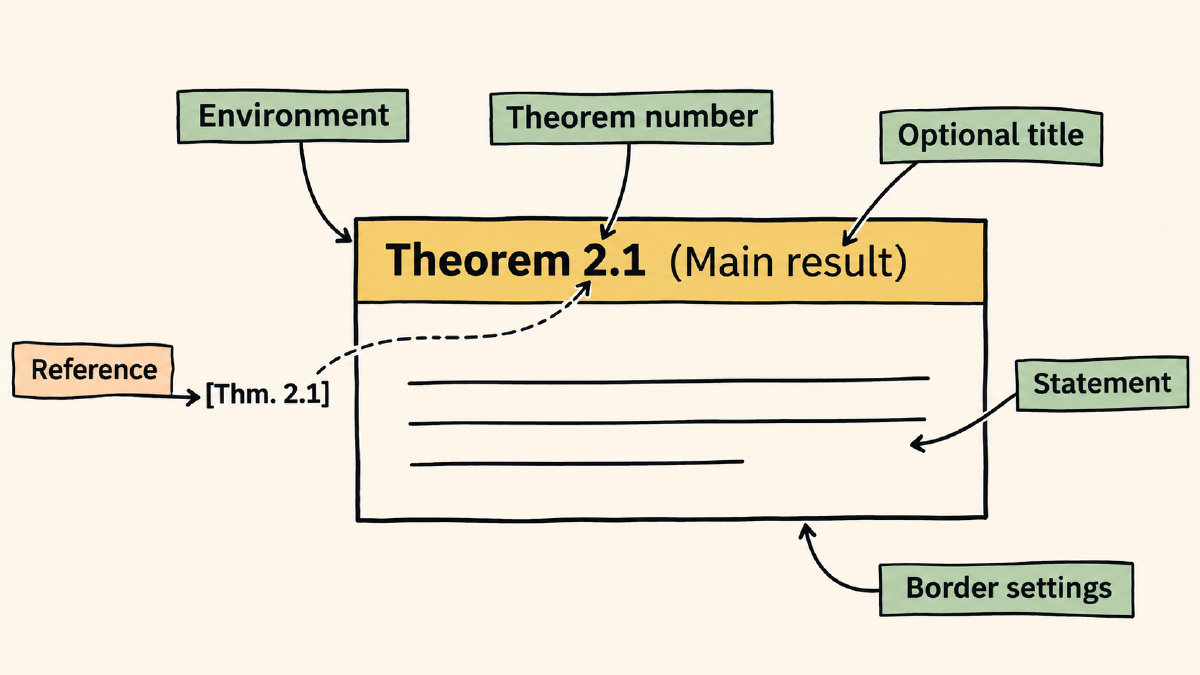
Overleaf provides an article-class example that illustrates an ordinary theorem:
\begin{theorem}[Pythagorean theorem]

The square of the hypotenuse of a right-triangle is equal to the sum of the squares of the other two sides. That is:

$$ x^2 + y^2 = z^2 $$

\label{pythagorean}

\end{theorem}
In this example, we can later refer back to the theorem using its internal label:
As noted in Theorem \ref{pythagorean}, ...
This example includes both the optional heading as well as the internal label that appears inside the environment itself. The equation itself is displayed separately and is surrounded by the dollar signs to indicate that it should be formatted using the math formatting rules, which generally produce italicized characters and a different type of spacing.