
How to Type X Bar in Word
By imagetolatex team · Published
The quickest way to type x bar in Word is an equation: press Alt+= (Control+= on a Mac), type x\bar and press Space — Word puts the bar over the x. In normal text you can type x, then 0304, then press Alt+X on Windows to add a combining macron.
Method 1: in an equation (Windows and Mac)
- Step 1: Insert an equationPress Alt+= on Windows or Control+= on a Mac, or choose Insert › Equation.
- Step 2: Type the letter and the accent codeType
x\barand press Space. Word applies the bar to the character before it.\hat,\tildeand\dotwork the same way. - Step 3: Continue the formulaKeep typing, for example
=1/nand Space for a fraction, then press → to leave the equation.
If your Word uses LaTeX input (Equation › LaTeX), type \bar{x} instead and press Space.
Method 2: the Accent gallery
- Step 1: Open the Equation tabClick inside an equation so the Equation tab appears.
- Step 2: Choose Accent › BarIn the Structures group click Accent and pick Bar (short) or Overbar (stretches over several characters).
- Step 3: Fill the boxClick the small placeholder box and type x.
Method 3: x̄ in normal text
When the x̄ must sit in a sentence or a table cell without an equation box, use a combining character. On Windows type x, then 0304, then press Alt+X: Word turns the code into a macron above the x. 0305 gives a longer overline.
On a Mac, Word has no Alt+X; insert the bar through Insert › Advanced Symbol (search for "combining macron") right after the x, or use an equation.
Combining characters depend on the font. In Calibri or Times New Roman the bar may sit slightly off; an equation always looks right.
y-bar, p-hat and other statistics symbols
| Symbol | In an equation type | Normal text (Windows) |
|---|---|---|
| x̄ (sample mean) | x\bar Space | x 0304 Alt+X |
| ȳ | y\bar Space | y 0304 Alt+X |
| p̂ (sample proportion) | p\hat Space | p 0302 Alt+X |
| x̃ (median) | x\tilde Space | x 0303 Alt+X |
| μ, σ | \mu, \sigma Space | Insert › Symbol |
Paste a whole formula from LaTeX
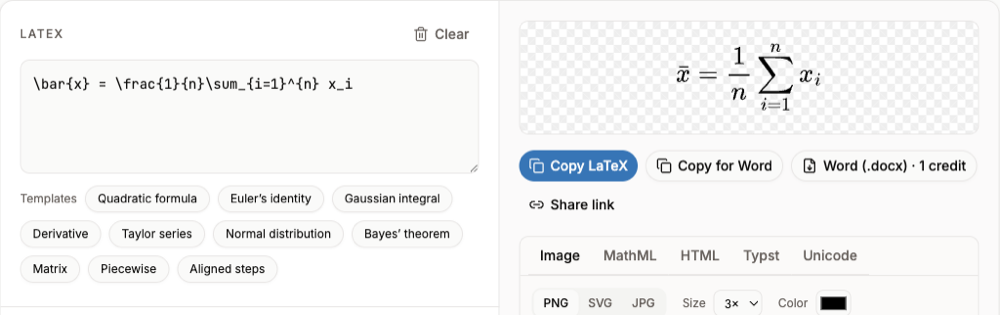
For a longer formula with x̄, write it once in LaTeX in the LaTeX equation editor, check the preview, and click Copy for Word. It pastes into Word as an editable equation, bar included.
FAQ
- What is the shortcut for x bar in Word?
- In an equation (Alt+=) type
x\barand press Space. In normal text on Windows type x,0304, then Alt+X. - How do I type x bar on a Mac?
- Insert an equation with Control+=, type
x\barand press Space, or use Accent › Bar on the Equation tab. - What is the difference between Bar and Overbar?
- Bar is a short accent over one character; Overbar stretches over everything in the box, for expressions like a line segment AB.
- Why does my x bar look misaligned in text?
- Combining characters depend on the font. Use an equation for a consistent look.
Sources
Related guides
- Word Equation ShortcutsThe shortcut that opens an equation and the typing codes that build fractions, scripts and symbols.
- Microsoft Word Equation EditorWhere the equation editor is in current Word, how to type and edit math, and what happened to Equation 3.0.
- How to Convert a Word Equation to LaTeXRead the LaTeX behind one Word equation, or convert every equation in a .docx.