
Equation to LaTeX Converter
Drop a picture of an equation and get its LaTeX code with a rendered preview. Prefer to type it? Open the LaTeX equation editor instead.
- 3 free a day, no sign-up
- Printed and handwritten equations
- Copy as LaTeX, MathML or Word
Paste a formula screenshot with Ctrl+V
or drop an image here · PNG, JPG, WebP · large images are resized for you
Sample result
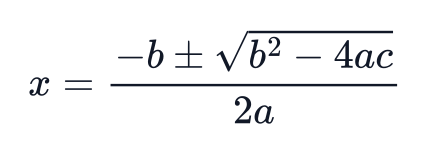 became
x = \frac{-b \pm \sqrt{b^2 - 4ac}}{2a}How to convert an equation to LaTeX
Step 1: Add the equation image
Paste a screenshot, drop a file or choose one. A cropped image of just the equation gives the cleanest code.
Step 2: Convert and compare
Press Convert to LaTeX. The code and a rendered preview appear together so you can spot a wrong symbol.
Step 3: Copy where you need it
Copy the LaTeX for Overleaf or Markdown, copy it as a Word equation, or download .docx, PNG or SVG.
From a picture or from scratch
Most people looking for equation-to-LaTeX have the equation in front of them as a picture: a slide, a PDF, a textbook page or an AI chat answer. The converter above reads that picture.
If you would rather build the equation symbol by symbol, the LaTeX equation editor gives you a symbol panel and a live preview, and exports the same formats.
What the LaTeX looks like
The result is plain math-mode LaTeX without surrounding dollar signs, ready to paste between $…$, \[…\] or into an equation environment. Multi-line equations come back as an aligned block.
- Standard commands only, no custom macros
- Works with Overleaf, Markdown editors, Notion and Jupyter
- MathML copy for web pages and Word
Other converters
- Image to LaTeX ConverterPaste or upload a math screenshot or picture and get LaTeX, MathML and an editable Word equation, with a live preview to fix any symbol.
- Math OCR OnlineOCR built for math: formulas and whole pages to LaTeX, MathML and Word equations.
- Handwritten Math to LaTeXPhotograph handwritten equations and get LaTeX with a live preview to check and fix it.
- LaTeX Equation EditorFree online LaTeX equation editor with a live MathJax preview, symbol panel and templates; export PNG, SVG, JPG, MathML, HTML, Typst or Unicode, copy to Word, or share a link.
- LaTeX to Word ConverterTurn a .tex file into a Word document whose equations open in the Word equation editor.
Equation to LaTeX questions
- Is the equation to LaTeX converter free?
- Yes, for printed single equations: 3 a day without an account and 6 a day with a free account. Handwriting and pages with several equations use credits.
- Does the output include $ signs?
- No. You get the math itself, so you can wrap it in inline or display delimiters as your document needs.
- Can I edit the LaTeX before copying?
- Yes. Edit it in the code box; the preview updates as you type.
- What if my equation spans several lines?
- Multi-line equations come back inside an aligned environment. For a page with several separate equations, use the page mode.