
Image to LaTeX for Overleaf
By imagetolatex team · Published
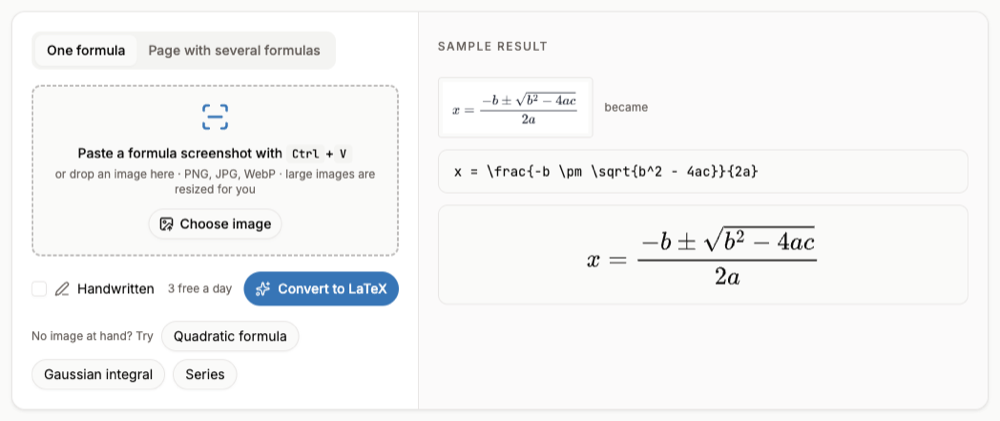
To get an equation from an image into Overleaf as real LaTeX, convert the picture to code first: paste the screenshot into an image to LaTeX converter, copy the LaTeX and paste it inside \[ … \] or an equation environment. If you actually want the picture itself in your document, that is \includegraphics, covered at the end.
An equation image into Overleaf
- Step 1: Convert the imagePaste the screenshot into the image to LaTeX converter with Ctrl+V. Single printed formulas are free within a daily limit.
- Step 2: Check the previewCompare it with the original and fix any symbol in the code box.
- Step 3: Copy LaTeXClick Copy LaTeX. The code has no
$delimiters, so you choose how it is displayed. - Step 4: Paste into OverleafPut it inside an environment and recompile.
In your .tex file
\begin{equation}
  \int_{-\infty}^{\infty} e^{-x^2}\, dx = \sqrt{\pi}
\end{equation}
Add \usepackage{amsmath} (and amssymb for symbols such as \mathbb) to the preamble if the formula uses them.
A whole paper or chapter
For a PDF, the PDF to LaTeX converter returns a project you can upload to Overleaf as a zip (New Project > Upload Project). Custom macros from the original source are not recovered, since the converter reads the rendered pages.
If you meant a figure: \includegraphics
- Step 1: Upload the imageIn Overleaf click the upload icon at the top left of the file tree and drop in the PNG, JPG or PDF.
- Step 2: Load graphicxAdd
\usepackage{graphicx}to the preamble. - Step 3: Include itUse a figure environment with
\includegraphicsand the file name.
Figure
\begin{figure}[htp]
  \centering
  \includegraphics[width=0.6\linewidth]{my-image}
  \caption{A caption}
\end{figure}
FAQ
- How do I convert an image to LaTeX?
- Use a math OCR converter: paste the image, check the rendered preview against the original, and copy the LaTeX.
- Why does Overleaf show an error after pasting?
- Usually a missing package (amsmath, amssymb) or math pasted outside a math environment. Wrap it in
\[ … \]. - Can I convert handwritten equations for Overleaf?
- Yes, tick Handwritten. Handwriting needs a free account and a credit per image.
- Can I convert tables too?
- Build or paste them in the LaTeX table generator, or convert a PDF with PDF to LaTeX.