
Snipping Tool for Mac
By imagetolatex team · Published
Macs have a snipping tool built in, no download needed. Press Shift+Command+4 and drag to capture part of the screen; add Control (Control+Shift+Command+4) to copy the snip to the clipboard instead of saving a file. Shift+Command+5 opens the Screenshot app with a timer and save options.
Mac snipping shortcuts
| What you want | Keys | Result |
|---|---|---|
| Part of the screen, as a file | Shift+Command+4, then drag | PNG on the desktop |
| Part of the screen, to paste right away | Control+Shift+Command+4, then drag | Copied to the clipboard |
| A window or menu | Shift+Command+4, then Space, then click | Window with shadow (hold Option to drop it) |
| The whole screen | Shift+Command+3 | PNG on the desktop |
| Screenshot app with options | Shift+Command+5 | Timer, save location, record video |
While dragging, hold Space to move the selection without resizing it, and press Esc to cancel. The floating thumbnail in the corner opens a markup editor if you click it.
The Windows equivalents
On Windows, Win+Shift+S opens the Snipping Tool overlay and copies the snip to the clipboard. PrtScn copies the whole screen. The Snipping Tool's Text actions can copy plain text out of a snip, but not math structure.
Snip an equation, get LaTeX
- Step 1: Snip to the clipboardPress Control+Shift+Command+4 and drag tightly around the formula.
- Step 2: Paste into the converterOpen the image to LaTeX converter and press Command+V. Single printed formulas are free within a daily limit.
- Step 3: Use the resultCopy LaTeX for Overleaf or Notion, or Copy for Word for an equation in Word.
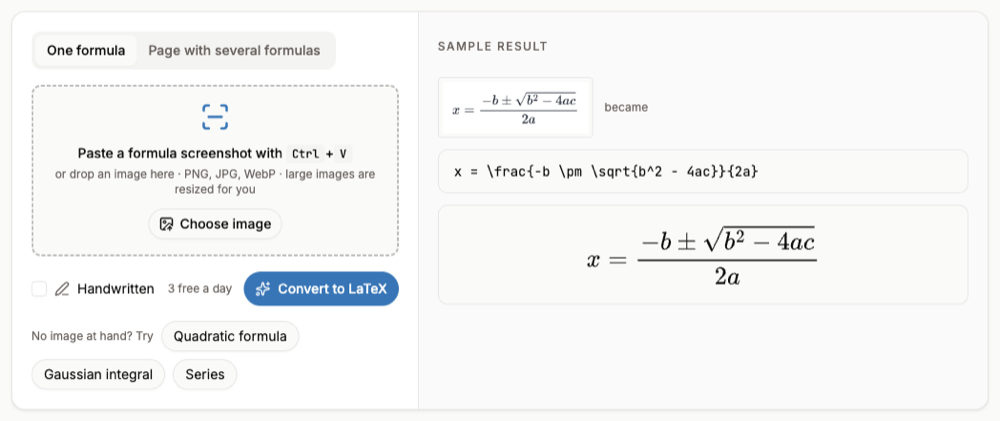
Text recognition built into screenshot tools reads letters, not math: a fraction becomes a line of characters and exponents drop to the baseline. A math converter keeps the structure as LaTeX.
FAQ
- Is there a Snipping Tool app for Mac?
- macOS has its own: the Screenshot app (Shift+Command+5) and the Shift+Command+4 shortcut. Third-party apps add annotation and scrolling capture.
- How do I snip and paste on a Mac?
- Press Control+Shift+Command+4, drag over the area, then paste with Command+V.
- Where do Mac screenshots go?
- To the desktop by default, named "Screen Shot [date] at [time]". Change the location in the Options menu of the Screenshot app.
- Why can I not screenshot some apps?
- Some apps, such as video streaming apps, block screenshots of their windows.