
How to Copy Equations from YouTube Videos to Word
By imagetolatex team · Published
Transcripts and AI summaries of a YouTube lecture capture what is said, not the formulas written on screen. To get an equation into your notes, pause on a sharp frame, take a screenshot of the formula, convert the image to LaTeX and paste it into Word as an equation.
From video frame to Word equation
- Step 1: Pause on a clear frameSet the video quality to the highest available (gear icon > Quality) and pause when the whole formula is visible. Use the , and . keys to step one frame back or forward while paused.
- Step 2: Screenshot only the formulaWindows: Win+Shift+S. Mac: Control+Shift+Command+4 to copy the area to the clipboard. Leave the player controls out of the shot.
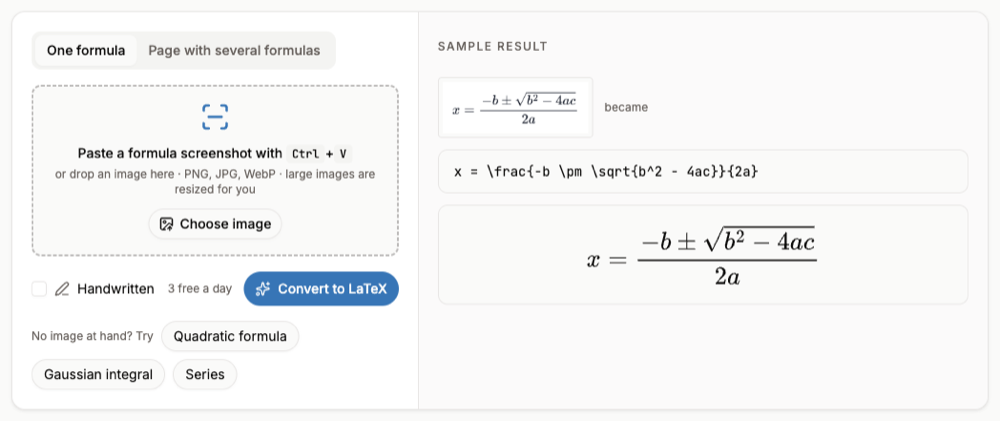
- Step 3: Convert the screenshotOpen the image to LaTeX converter and paste with Ctrl+V (Command+V on a Mac). For handwriting on a lecture board, tick Handwritten.
- Step 4: Copy into WordCompare the preview with the video, then Copy for Word and paste into your notes.
When the frame is blurry
- Motion blur: step frame by frame until the writing is still.
- Low resolution: switch the player to full screen before the screenshot so the formula covers more pixels.
- Presenter in the way: find a later frame where the formula is uncovered, or capture two parts and convert them separately.
Only copy what you need for your own study notes, and credit the lecture when you reuse its material.
A slide full of formulas
When a video shows a slide with several equations, capture the whole slide and choose Page with several formulas. Each formula is listed separately, and Export selected to Word downloads them in one file (free account and credits).
FAQ
- Can I get equations from the YouTube transcript?
- Transcripts contain speech. Formulas written on a board or a slide are only in the picture, so they need a screenshot.
- Is this free?
- Converting one printed formula at a time is free within a daily limit. Handwritten formulas and whole slides need a free account and credits.
- Which keys step through frames?
- With the video paused, , goes back one frame and . goes forward one frame on YouTube in a desktop browser.
- Can I paste into Google Docs instead?
- Copy the LaTeX and render it with an add-on, or download a PNG from the LaTeX editor.