
How to Copy Equations from Lecture Slides to Word
By imagetolatex team · Published
How you copy equations from lecture slides depends on the file you got. In a PowerPoint file, equations made with PowerPoint's equation tool can be copied straight into Word. In a PDF or an image of the slides, the equations are just drawn shapes or pixels, so screenshot them and convert the image to Word equations.
Slides as a PowerPoint file (.pptx)
- Step 1: Click the equationIf an Equation tab appears, it is a native equation.
- Step 2: Copy itSelect the equation box and press Ctrl+C.
- Step 3: Paste into WordPaste into Word with Ctrl+V; it stays an editable equation.
If clicking the equation selects a picture instead, the lecturer pasted an image or used an older equation object. Treat it like a PDF slide below.
Slides as a PDF or images
- Step 1: Zoom in on the slideOpen the PDF and zoom so the equations are large on screen.
- Step 2: Screenshot the equationsOne equation: capture just that formula. A slide full of formulas: capture the whole slide.
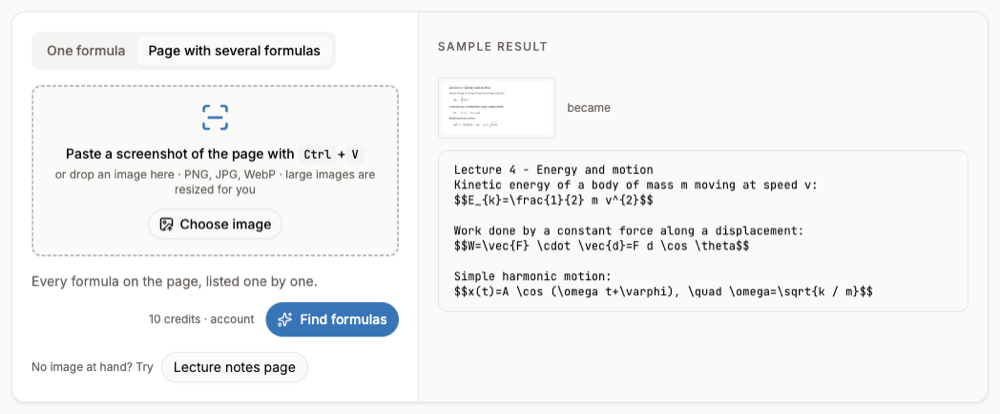
- Step 3: ConvertPaste into the image to LaTeX converter. Use One formula for a single equation (free within a daily limit) or Page with several formulas for a whole slide (free account and credits).
- Step 4: Export to WordFor one formula, Copy for Word. For a slide, tick the formulas you want and Export selected to Word.
The whole slide deck at once
To turn an entire PDF of slides into an editable document, use OCR PDF to Word: every page is read with OCR and equations come out as native Word equations. Expect to clean up the layout, since slides are not laid out like a document.
FAQ
- Why can I not copy an equation from a PDF slide?
- In most PDFs the equation is stored as positioned glyphs or shapes, not as math. Copying gives scrambled characters.
- Can I copy MathType equations from slides?
- MathType objects need MathType to edit. A screenshot converted to a Word equation removes that dependency.
- What about handwritten slides from a tablet?
- Tick Handwritten in the converter; handwriting uses the high-accuracy engine (free account and a credit per image).
- Can I get LaTeX instead of Word equations?
- Yes, Copy LaTeX gives the code for Overleaf, Notion or Markdown notes.