
How to Copy ChatGPT Equations to Word
By imagetolatex team · Published
ChatGPT shows equations rendered, but what reaches the clipboard is not a Word equation. Users report in 2026 that pasting from the ChatGPT website can drop the equations entirely, and the desktop app pastes raw LaTeX. The fix is to get the LaTeX of each equation and turn it into a Word equation: with Word's own LaTeX input, with Copy for Word in a free LaTeX editor, or from a screenshot.
Why pasted ChatGPT math breaks
ChatGPT writes math as LaTeX and draws it in the browser. Word only turns clipboard content into an equation when it receives equation markup (MathML or Office Math). When that markup is missing you get raw code such as \frac{a}{b}, question marks, or blank gaps where equations were. Reddit users describe exactly this change in 2026, when pasting into Word stopped producing Word equations.
Step 1: get the LaTeX from ChatGPT
Ask ChatGPT for the source instead of copying the rendered answer. Code blocks have their own copy button, which copies the text exactly:
Give me the LaTeX source of every equation in your last answer, one equation per code block, without $ or $$ delimiters.You can also use the copy button under the message; the math usually comes out as LaTeX between delimiters such as \( … \) or $$ … $$, which the editor below strips for you.
Method 1: Copy for Word from the LaTeX editor (any Word)
- Step 1: Paste the LaTeXOpen the free LaTeX equation editor and paste one equation.
$,$$,\(and\[delimiters are removed automatically. - Step 2: Check the previewThe preview renders with MathJax. If ChatGPT made a syntax error, the editor says so and you can fix it before Word sees it.
- Step 3: Copy for WordClick Copy for Word, then paste into Word desktop with Ctrl+V. The equation arrives as a Word equation you can click and edit.
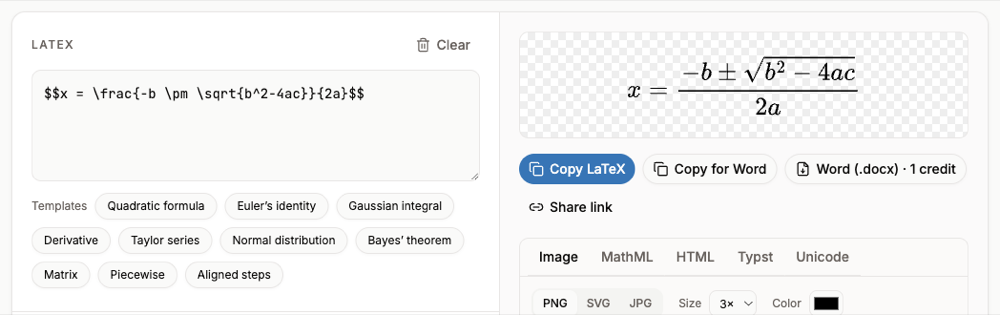
$$ from ChatGPT: the editor ignores the delimiters, renders the formula and Copy for Word hands it to Word as an equation.This works for environments Word's own LaTeX mode refuses, such as aligned and cases, because the conversion happens in the editor.
Method 2: paste the LaTeX into a Word equation (Microsoft 365)
- Step 1: Insert an equationIn Word press Alt+= (Windows) or Control+= (Mac).
- Step 2: Switch the input to LaTeXOn the Equation tab, in Conversions, choose LaTeX. This option is in Word for Microsoft 365.
- Step 3: Paste one equationPaste the LaTeX without
$$around it. - Step 4: Build it upChoose Convert > Professional or press Ctrl+=.
Word's LaTeX mode rejects \begin{...} environments (aligned, cases, pmatrix). For those, use the LaTeX editor method.
Method 3: many equations at once, from a screenshot
For a long worked solution, screenshot the answer and paste it into the image to LaTeX converter with Page with several formulas selected. Every formula is listed separately; tick the ones you want and Export selected to Word downloads one .docx with them all. Page mode needs a free account and uses credits; a single printed formula in One formula mode is free within a daily limit.
FAQ
- Why do equations disappear when I paste from ChatGPT into Word?
- The clipboard no longer carries equation markup that Word can convert, so Word pastes the text around the equations and drops or garbles the math. Paste the LaTeX through one of the methods above instead.
- Can ChatGPT create a Word file with equations?
- You can ask it to, but check the file: equations may still arrive as text. Converting the LaTeX yourself gives you control over each formula.
- Does this work with Google Docs?
- Google Docs does not accept Word equations from the clipboard. See How to Paste ChatGPT Equations into Google Docs.
- Is Copy for Word free?
- Yes. The LaTeX editor, its preview and Copy for Word need no account. Downloading a .docx needs an account.