
How to Copy Gemini Equations to Word
By imagetolatex team · Published
Gemini renders math on screen, but copying it, or using Export to Docs, gives you LaTeX code such as $$\sqrt[3]{27a^6 b^9}$$ instead of equations. For Word, turn that LaTeX into a Word equation (Word's LaTeX input or Copy for Word in a free LaTeX editor). For Google Docs, render the $$ code with the Auto-LaTeX Equations add-on.
Get clean LaTeX from Gemini
A Google product expert suggests telling Gemini how to format math, for example to use $$…$$ for display equations and never to put formulas inside code blocks. If you only need the code of one answer, ask for it directly:
Give me the LaTeX source of every equation in your last answer, one equation per code block, without $ or $$ delimiters.Into Word: Copy for Word
- Step 1: Paste one formula into the editorOpen the LaTeX equation editor and paste it;
$$delimiters are ignored. - Step 2: Check itCompare the preview with Gemini's answer. Mis-nested braces show as an error message.
- Step 3: Copy for WordClick Copy for Word and paste into Word desktop. The formula becomes an editable equation.
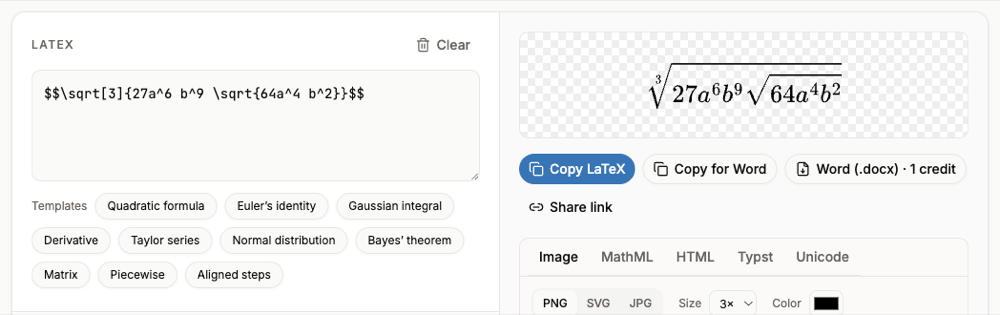
$$ included, rendered and ready for Copy for Word.Into Word: Word's LaTeX input (Microsoft 365)
- Step 1: Insert an equationIn Word press Alt+= (Windows) or Control+= (Mac).
- Step 2: Switch the input to LaTeXOn the Equation tab, in Conversions, choose LaTeX. This option is in Word for Microsoft 365.
- Step 3: Paste one equationPaste the LaTeX without
$$around it. - Step 4: Build it upChoose Convert > Professional or press Ctrl+=.
Word's LaTeX mode rejects \begin{...} environments (aligned, cases, pmatrix). For those, use the LaTeX editor method.
Into Google Docs: Export to Docs + Auto-LaTeX
- Step 1: Export the answerUse the share and export button under Gemini's answer and choose Export to Docs. The equations arrive as
$$ … $$code. - Step 2: Install Auto-LaTeX EquationsIn the new Doc choose Extensions > Add-ons > Get add-ons and install Auto-LaTeX Equations.
- Step 3: RenderStart the add-on and click Render Equations; each
$$block becomes an equation image.
This workflow is described by educator Eric Curts (Control Alt Achieve). More detail: LaTeX in Google Docs.
FAQ
- Why does Export to Docs show $$ code?
- Gemini writes math as LaTeX and Google Docs does not render LaTeX, so the code is shown as text. An add-on renders it.
- Can I copy Gemini equations on Android?
- The same LaTeX comes through; render or convert it on a computer, where Word desktop and Docs add-ons are available.
- Can I convert all equations of a long answer at once?
- Screenshot the answer and use Page with several formulas in the image to LaTeX converter, then export the selected formulas to one Word file (free account and credits).
- Does Copy for Word need an account?
- No, the editor and Copy for Word are free without sign-up.