
LaTeX in Google Docs
By imagetolatex team · Published
Google Docs does not compile LaTeX, but you have three ways to use it: type LaTeX-style commands such as \frac in the built-in equation editor, install the Auto-LaTeX Equations add-on to render $$ … $$ code, or paste formula images rendered from LaTeX. Which one fits depends on whether you need to edit the math later.
The three methods at a glance
| Method | Accepts full LaTeX | Editable in Docs | Needs install |
|---|---|---|---|
| Built-in equation editor | No, only backslash symbol names | Yes | No |
| Auto-LaTeX Equations add-on | Yes | Re-render from the code | Yes (add-on) |
| Formula image (PNG/SVG) | Yes | No, re-export to change | No |
1. Backslash commands in the built-in editor
Choose Insert > Symbols > Equation and type commands like \alpha, \frac or \sqrt followed by a space. This is LaTeX-flavoured typing, not LaTeX: you cannot paste a finished string such as \frac{a}{b}. It is best for short formulas you type yourself. Steps are in How to Insert an Equation in Google Docs.
2. The Auto-LaTeX Equations add-on
- Step 1: Install itIn the document, choose Extensions > Add-ons > Get add-ons, search for Auto-LaTeX Equations and install it.
- Step 2: Write the LaTeX in the textType or paste each formula between delimiters, for example
$$\frac{a}{b}$$. - Step 3: RenderOpen Extensions > Auto-LaTeX Equations > Start, then click Render Equations. Each formula becomes an image.
- Step 4: Edit laterUse the add-on's de-render option to turn images back into code, change it, and render again.
This is the route teachers use for math copied from Gemini or ChatGPT, which usually arrives as $$ … $$ code. Check the add-on's permissions in the Marketplace before installing it on a school or work account.
3. Formula images from LaTeX
Without add-ons, render the LaTeX yourself: paste it into LaTeX to PNG, choose the size and color, download the PNG and insert it with Insert > Image. Any LaTeX that MathJax supports works, including matrices and aligned equations.
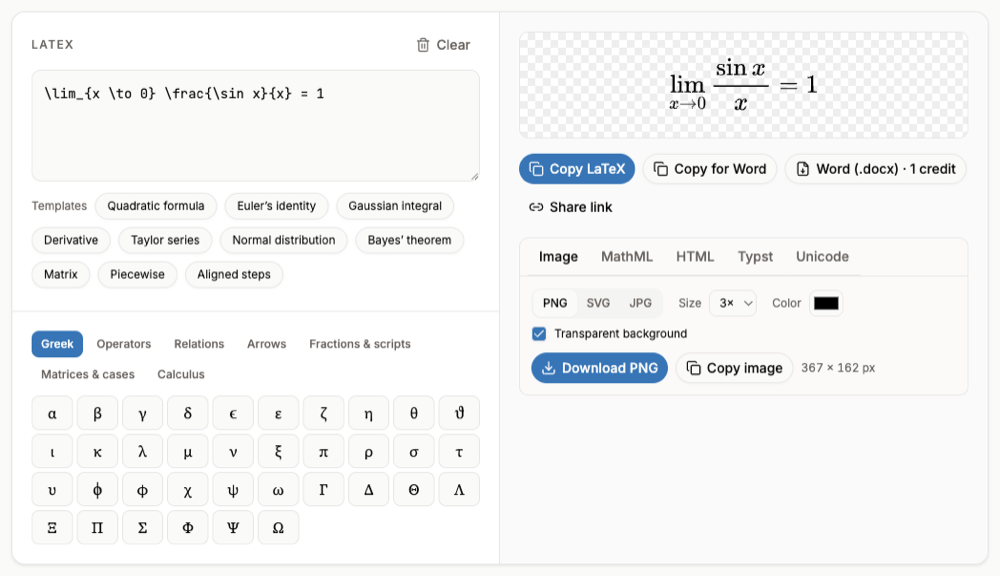
Add alt text to each formula image (right-click > Alt text) with the LaTeX, so screen-reader users and future you can read the math.
FAQ
- Can I use LaTeX in Google Docs?
- Not natively. The equation editor accepts backslash symbol names, and add-ons or images handle full LaTeX.
- Is Auto-LaTeX Equations free?
- It is listed on the Google Workspace Marketplace; check the listing for its current terms before installing.
- How do I make Google Docs look like a LaTeX document?
- That is about fonts and layout rather than equations. If you need true LaTeX output, write in Overleaf and share the PDF.
- Can I convert a Google Doc with equations to LaTeX?
- Download it as .docx (File > Download > Microsoft Word) and use the Word to LaTeX converter.