
How to Use LaTeX in Gmail
By imagetolatex team · Published
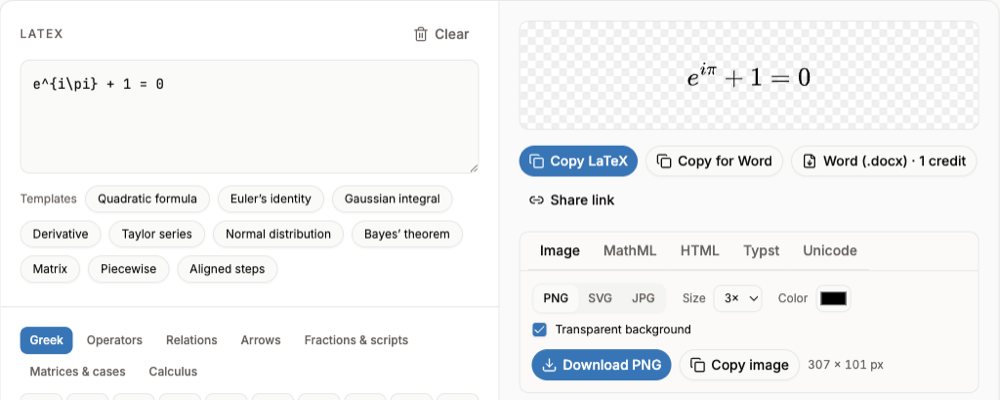
Gmail cannot render LaTeX by itself: \frac{a}{b} arrives as plain text. The method that works for every recipient is to turn the formula into an image — paste the LaTeX into LaTeX to PNG, download or copy the PNG, and insert it into the email. Browser extensions can render TeX in the compose window, but the recipient still receives an image or text.
Method 1: insert the equation as an image (works for everyone)
- Step 1: Render the formulaPaste your LaTeX into LaTeX to PNG. Keep Transparent background on and choose size 2× or 3× so it stays sharp.
- Step 2: Get the imageClick Download PNG, or Copy image to put it on the clipboard.
- Step 3: Insert it into the emailIn Gmail click Insert photo and choose Inline, then pick the PNG. Pasting the copied image into the message body also works in most browsers.
Images are not searchable and screen readers cannot read them. Add the LaTeX in the text too, for example after the image, if the recipient may need it.
Method 2: a browser extension that renders TeX
Some Chrome extensions, such as "TeX for Gmail and Outlook" in the Chrome Web Store, and user scripts shared on Reddit and the KaTeX discussions, render $…$ in the Gmail compose window. We have not tested them. Before installing, check what they send: the recipient usually gets an image, or plain text if they do not use the same extension.
An extension that reads and edits your email needs broad permissions. Review them on the store page, especially for a work account.
Method 3: plain LaTeX for technical readers
Mathematicians and physicists often read raw LaTeX fluently. Write inline math between dollar signs and keep it short: $E = mc^2$. For anything longer, link a rendered version or attach a PDF.
Which method to choose
| Method | Recipient sees | Best for |
|---|---|---|
| PNG image | The rendered formula, on any device | Students, clients, anyone |
| Extension | Usually an image; plain text without the extension | Frequent senders who accept the permissions |
| Plain LaTeX | Code such as \frac{a}{b} | Colleagues who read LaTeX |
FAQ
- Can Gmail render LaTeX?
- No. Gmail shows LaTeX as plain text. Send the formula as an image, or use an extension that renders it before sending.
- How do I put an equation in a Gmail message?
- Render it as a PNG with LaTeX to PNG, then use Insert photo › Inline.
- Does the recipient need anything installed?
- Not for an image. For extension-rendered math, the recipient sees whatever the extension inserted, usually an image.
- Does this work in Outlook?
- Yes, the image method works in any email program: insert the PNG as an inline picture.
Sources
Related guides
- LaTeX in Google DocsBackslash shortcuts, the Auto-LaTeX Equations add-on, and formula images, compared.
- How to Insert an Equation in Google DocsThe Insert > Symbols > Equation menu, backslash shortcuts, and what to do when you have LaTeX.
- How to Insert an Equation in Google SlidesGoogle Slides has no equation tool: images from LaTeX, add-ons, and the Google Docs workaround.