
How to Insert an Equation in Google Slides
By imagetolatex team · Published
Google Slides has no built-in equation editor; a Google help-community thread asking for one has more than a thousand "same question" votes. The reliable way is to insert the equation as an image: write it in LaTeX, download a transparent PNG or SVG, and add it with Insert > Image. Add-ons from the Workspace Marketplace are the other route.
1. Insert the equation as an image
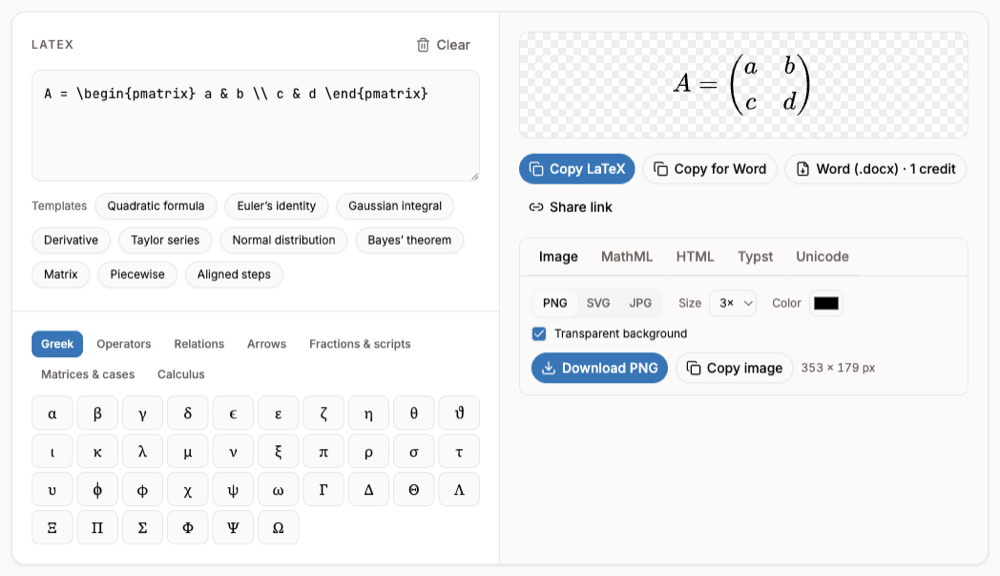
- Step 1: Write the equation in LaTeXOpen LaTeX to PNG and type or paste the LaTeX. The preview updates as you type.
- Step 2: Set size and colorPick a size (3x or higher keeps it sharp on a projector), a color that matches the slide, and keep Transparent background ticked.
- Step 3: DownloadDownload the PNG. A large PNG stays sharp when you resize it on the slide.
- Step 4: Insert into the slideIn Slides choose Insert > Image > Upload from computer, then place and resize it.
2. Use an add-on
In Slides choose Extensions > Add-ons > Get add-ons and search for "equation". Editors such as Equation Editor ++ let you build or type math and insert it on the slide. Some organizations disable add-ons, so this may not be available on a school account.
3. Build it in Google Docs, then capture it
Teachers often write the equation with Insert > Symbols > Equation in Google Docs, take a screenshot and paste it into Slides. It works, but the screenshot is low resolution and loses the math. Rendering from LaTeX gives a sharper image and keeps the source for later edits.
If the equation already exists as a picture (a scan, a textbook page), paste it into the image to LaTeX converter to get the LaTeX, then render a clean version.
FAQ
- Does Google Slides have an equation editor?
- No. Google Docs has one; Slides does not. Use images or an add-on.
- Can I edit an equation image later?
- Not in Slides. Keep the LaTeX (the tool's Share link stores it in the URL), change it, and download a new image.
- PNG or SVG for slides?
- Use PNG for Google Slides: it uploads PNG, JPG and GIF images. Download at 3x or more so the formula stays sharp on a large screen. SVG is better for web pages and PowerPoint.
- Can I present math in PowerPoint instead?
- PowerPoint desktop has a native equation editor. See How to Insert an Equation in PowerPoint.