
How to Copy Perplexity Equations to Word
By imagetolatex team · Published
Perplexity draws equations in the browser, and a plain copy into Word gives LaTeX code or broken symbols. Ask Perplexity for the LaTeX of each equation, then turn it into a Word equation with Word's LaTeX input or with Copy for Word in a free LaTeX editor. For an answer full of formulas, convert a screenshot instead.
Get the LaTeX
Give me the LaTeX source of every equation in your last answer, one equation per code block, without $ or $$ delimiters.Copy each code block with its copy button. Check what you paste: depending on how you copied, the text may include delimiters or surrounding sentences.
Method 1: Copy for Word
- Step 1: Paste into the editorOpen the LaTeX equation editor and paste the LaTeX.
- Step 2: Compare with PerplexityMake sure limits, exponents and fractions match what Perplexity showed.
- Step 3: Copy for WordClick Copy for Word and paste into Word desktop.
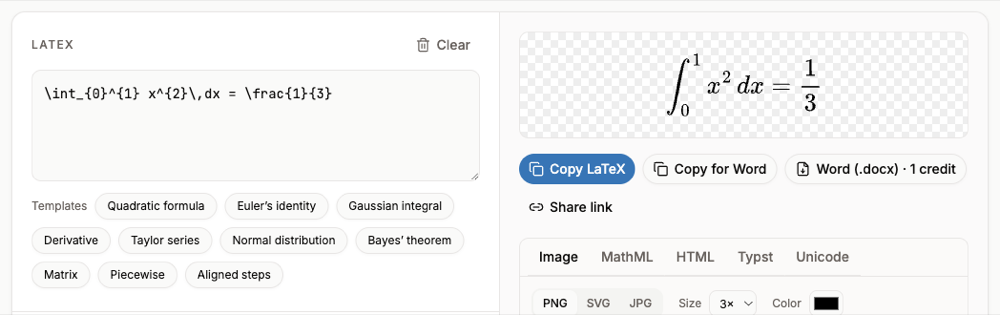
Method 2: paste the LaTeX into a Word equation (Microsoft 365)
- Step 1: Insert an equationIn Word press Alt+= (Windows) or Control+= (Mac).
- Step 2: Switch the input to LaTeXOn the Equation tab, in Conversions, choose LaTeX. This option is in Word for Microsoft 365.
- Step 3: Paste one equationPaste the LaTeX without
$$around it. - Step 4: Build it upChoose Convert > Professional or press Ctrl+=.
Word's LaTeX mode rejects \begin{...} environments (aligned, cases, pmatrix). For those, use the LaTeX editor method.
Answers with many formulas
Screenshot the answer and paste it into the image to LaTeX converter with Page with several formulas. Each formula is listed with its preview; Export selected to Word gives you one .docx (free account and credits).
FAQ
- Why does Perplexity math look broken in Word?
- Word receives LaTeX text or rendered symbols, not equation markup, so it cannot build an equation.
- Does this work on Word for Mac?
- Yes. Insert an equation with Control+=; Copy for Word pastes into Word for Mac as well.
- Can I paste into Google Docs instead?
- Use an add-on that renders LaTeX, or formula images. See LaTeX in Google Docs.
- Are browser extensions an option?
- Several extensions promise one-click export. We have not tested them; the methods here use only Word and a web page.