
How to Copy Claude Equations to Word
By imagetolatex team · Published
Claude writes math as LaTeX, so a pasted answer shows code such as $$\nabla \cdot \mathbf{E} = \frac{\rho}{\varepsilon_0}$$ in Word. Copy the LaTeX of each equation and convert it: paste it into a Word equation in LaTeX mode, or into a free LaTeX editor and use Copy for Word.
Get the LaTeX from Claude
Claude's copy button copies the reply as text, with the equations as LaTeX code. To copy formulas one by one, ask for them in code blocks:
Give me the LaTeX source of every equation in your last answer, one equation per code block, without $ or $$ delimiters.Method 1: Copy for Word from the LaTeX editor
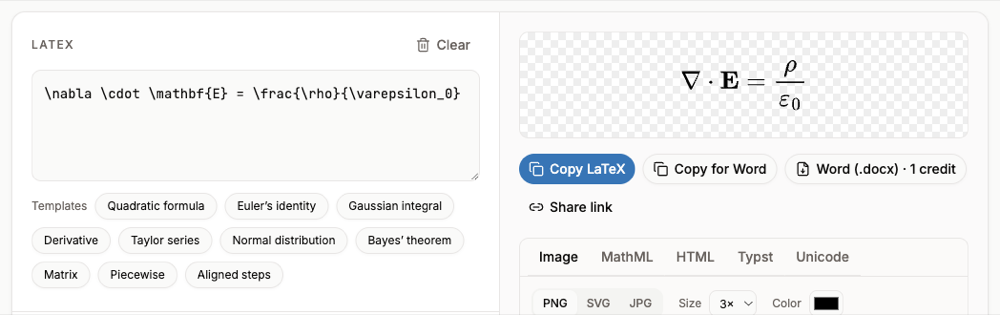
- Step 1: Paste into the editorOpen the LaTeX equation editor and paste one equation.
- Step 2: Check the previewBold vectors (
\mathbf), Greek letters and fractions render as they will look in Word. - Step 3: Copy for WordClick Copy for Word and paste into Word desktop.
Method 2: paste the LaTeX into a Word equation (Microsoft 365)
- Step 1: Insert an equationIn Word press Alt+= (Windows) or Control+= (Mac).
- Step 2: Switch the input to LaTeXOn the Equation tab, in Conversions, choose LaTeX. This option is in Word for Microsoft 365.
- Step 3: Paste one equationPaste the LaTeX without
$$around it. - Step 4: Build it upChoose Convert > Professional or press Ctrl+=.
Word's LaTeX mode rejects \begin{...} environments (aligned, cases, pmatrix). For those, use the LaTeX editor method.
When you only have the rendered answer
If you are working from a shared conversation or a screenshot someone sent, paste the image into the image to LaTeX converter. You get the LaTeX, a preview to check it, and Copy for Word.
FAQ
- Why does Claude math paste as code?
- The copy button copies the math as LaTeX text. Word does not convert LaTeX text into equations on paste.
- Can Claude make a .docx for me?
- Depending on your plan and settings, Claude can create files; check the equations in the result, and convert any that arrive as text with the steps above.
- What about equations with several aligned lines?
- Word's LaTeX mode refuses
\begin{aligned}. The LaTeX editor renders it and Copy for Word hands Word the finished equation. - Is there a limit?
- The LaTeX editor has no limit. Converting screenshots is free for single printed formulas within a daily limit.