
LaTeX in Notion
By imagetolatex team · Published
Notion renders LaTeX with KaTeX in two ways: a block equation on its own line (type /math and press Enter), and an inline equation inside a sentence (wrap the LaTeX in $$ on both sides, or press Ctrl/Cmd+Shift+E). KaTeX covers most, but not all, of LaTeX math.
Block equations
- Step 1: Add the blockOn an empty line type
/mathand press Enter, or click + in the margin and choose Block equation. - Step 2: Type or paste LaTeXEnter the math without delimiters, for example
\sum_{n=1}^{\infty} \frac{1}{n^2} = \frac{\pi^2}{6}. - Step 3: ConfirmPress Ctrl/Cmd+Enter or click Done. Click the equation later to edit it.
Inline equations
- Text shortcut: type
$$, the LaTeX, then$$again. It turns into an equation when you close it. - Keyboard: press Ctrl/Cmd+Shift+E, type the LaTeX in the input and press Enter.
- From existing text: select the text and click the √x button in the formatting menu (same shortcut).
What KaTeX in Notion does not do
Notion notes that KaTeX spans most but not all of LaTeX. Things that commonly fail:
- The
alignenvironment. Use\begin{aligned} … \end{aligned}inside a block equation instead. - Packages and custom macros from a LaTeX preamble (
\usepackage,\newcommandacross blocks). - Automatic equation numbering and
\label/\refcross-references.
Getting LaTeX into Notion from screenshots and PDFs
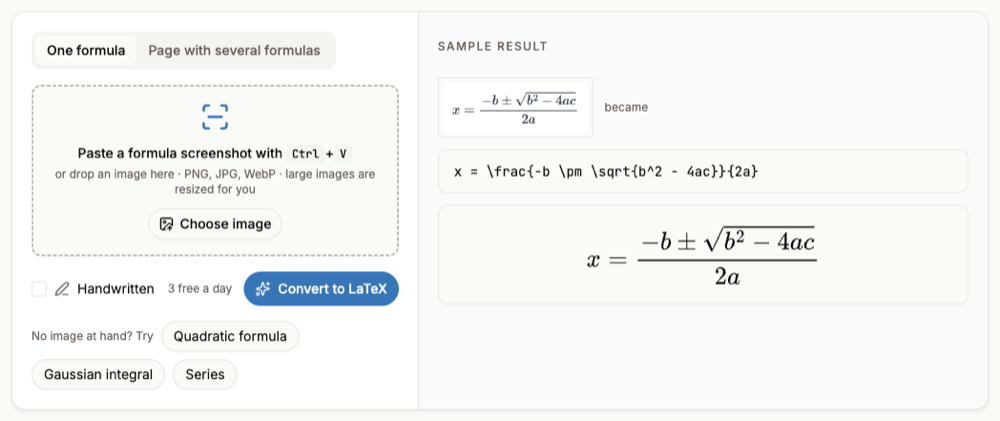
Notes often start from a slide, a paper or a textbook. Paste a screenshot of the formula into the image to LaTeX converter, click Copy LaTeX, and paste it into a Notion block equation. For a page with many formulas, Page with several formulas can copy the whole page as Markdown with LaTeX math.
FAQ
- Does Notion support LaTeX?
- Yes, through KaTeX, in block and inline equations. It supports a large subset of LaTeX math, not full documents.
- Why does my align environment not work in Notion?
- KaTeX has no
align; usealignedinside a block equation. - How do I convert between inline and block equations?
- Copy the LaTeX from one and paste it into the other type; Notion keeps them as separate kinds.
- Can I paste a Word equation into Notion?
- Not as math. Get its LaTeX first (Word for Microsoft 365 can show it; see How to Convert a Word Equation to LaTeX).