
OneNote Handwriting to Text
By imagetolatex team · Published
In OneNote for Windows, select your handwriting with Draw > Lasso Select and click Ink to Text; OneNote replaces the ink with typed text. Microsoft notes the option is not available in OneNote for the web. For handwritten notes on paper, or notes full of formulas, photograph the page and use a handwriting converter.
Convert ink to text in OneNote
- Step 1: Open the Draw tabOpen the page with your handwritten notes and choose the Draw tab.
- Step 2: Select the handwritingClick Lasso Select and drag around the writing you want to convert.
- Step 3: ConvertClick Ink to Text. The selected ink is replaced with typed text you can edit and search.
For another language, install its handwriting support in Windows, then set it with Review > Language > Set Proofing Language before converting.
No Ink to Text button?
- OneNote for the web does not have the conversion, per Microsoft's help page. Open the notebook in the desktop app.
- Nothing selected: the button works on a lasso selection, not on the whole page.
- Drawings, not writing: shapes and sketches are not converted.
Handwritten math and paper notes
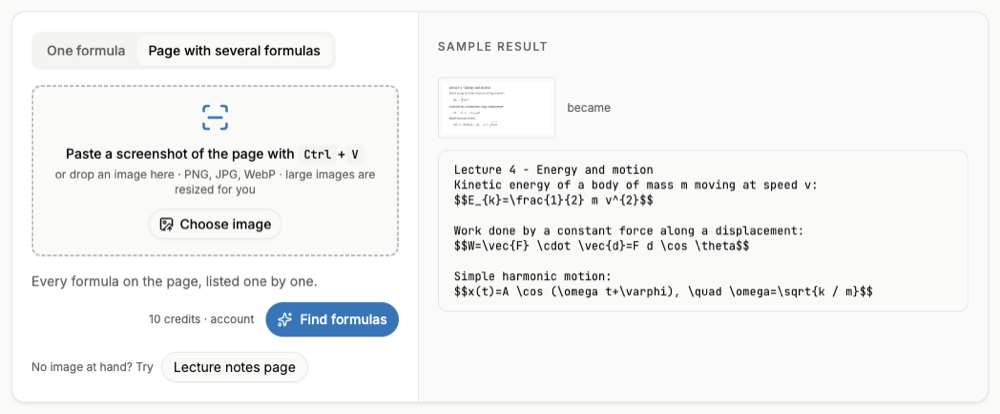
Ink to Text is built for words; fractions and exponents come out flattened. OneNote's separate math tools on the Draw tab (Ink to Math or Math, depending on the version) handle single equations. For a page of notes that mixes sentences and formulas, or notes on paper, photograph the page and upload it to handwriting to text: you get editable text with the math kept as LaTeX. Reading a page needs a free account and credits.
FAQ
- Why does my OneNote not have a transcribe option?
- Ink to Text is in OneNote for Windows. OneNote for the web does not offer it.
- Can OneNote convert handwritten equations?
- Use the math tools on the Draw tab (Ink to Math or Math, depending on your version) for a single equation. Ink to Text is meant for words.
- Can I convert a photo of paper notes in OneNote?
- OneNote can search text in pictures, but converting a photo into editable text is easier with a handwriting OCR tool.
- Is my handwriting stored by the converter?
- No. The photo is read and discarded; the text result is kept in your history.